

Crinklewott 💕 @thingywott@awoo.space

oh hi! i do computers, and sometimes draw stuff~ i like lo-fi things and cute aesthetics!
i also probably like you
(also, tagged #abdl ahead, soooo 🔞)
Joined Nov 2017
@ctrlaltdog@chitter.xyz hmm, i see volmgr errors...
are there any hints in there..? because that just makes me think it's a disk even more
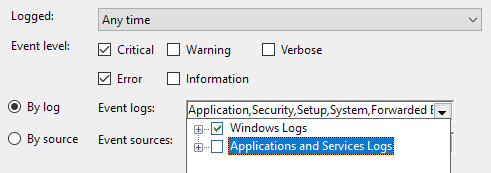
@ctrlaltdog@chitter.xyz oh heck, your log categories are too powerful...in that case, maybe uncheck the "Applications and Services" logs then?
you can also change the "last hour" to "all time" if you do that
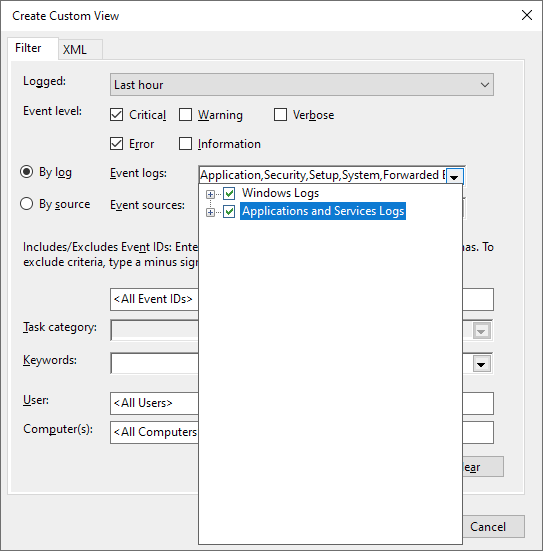
@ctrlaltdog@chitter.xyz oofa. i guess the thing i'd do is to make a custom error and critical log message view in the event viewer (like the screenshot), and then wait for the next time something acts up to check it for hints
if that doesn't give anything useful, then, as much as i hate to suggest it, maybe back up your drives, and then try running your computer without the NVMe for a while to see if that's what's getting you ^^'
smash new character
@halcy gosh, that opening video destroyed me
i don't know what i was expecting, but it definitely wasn't THAT
also hahah, yeah. i loved sakurai's little anecdote
@ctrlaltdog@chitter.xyz that was...a good question actually
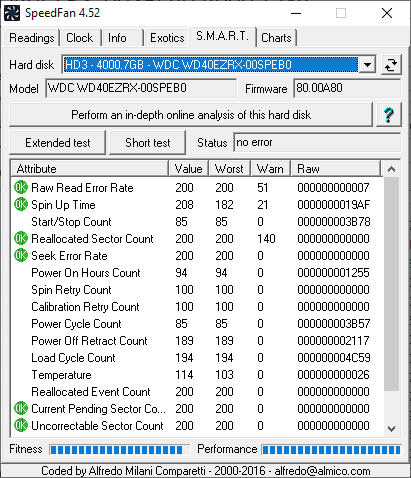
i know that gsmartcontrol can do it, but i don't actually see anything in CrystalDiskInfo
it seems like speedfan can do it though! (i was just talking about the extended test, but i imagine the in-depth analysis couldn't hurt either) http://www.almico.com/sfdownload.php
i think this data gets uploaded though, so i'm not sure how comfy you are with that idea
@ctrlaltdog@chitter.xyz hm, yeah, nothing really jumps out at me, though i also don't know what the lg service does ^^'
and a long POST huh? maybe some service that interacts with your hardware is doing A Bad? in fact, that actually points back to hard drive stuff a little. can you see if you can run a full SMART test on your drives? i feel like there might be something there that's being missed
that could also explain why a service caused that bluescreen--because if it fails to do I/O, that can happen
Crinklewott 💕
boosted

Windows Defender just detected the ePub of "Practical Malware Analysis" by Michael Sikorski as a virus
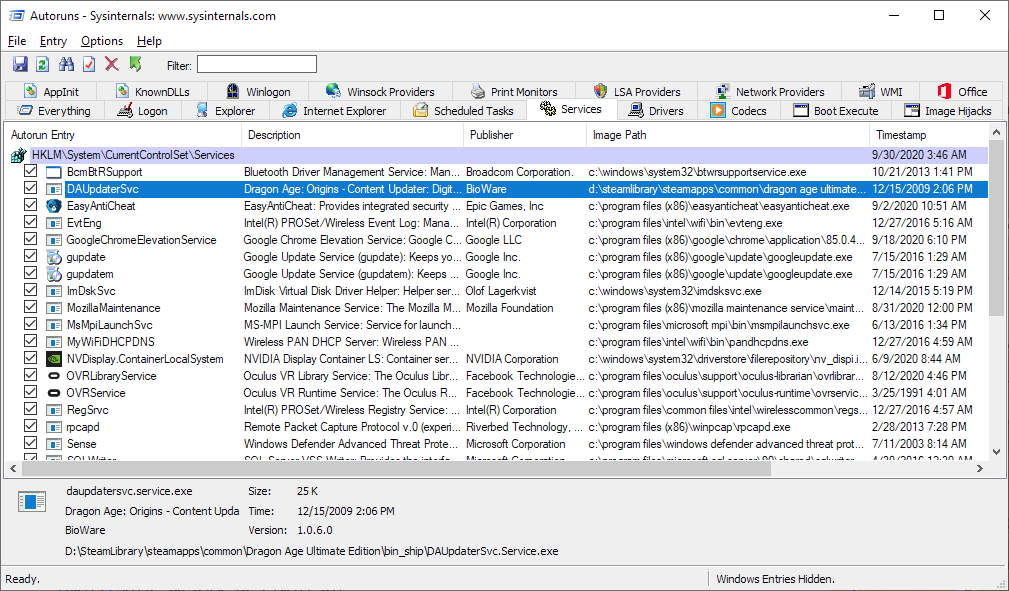
@ctrlaltdog@chitter.xyz the main reason that autoruns is better for this is because you can see the image path, so you can more easily tell if it's a service you even want
@ctrlaltdog@chitter.xyz (or better yet! autoruns in sysinternals! https://docs.microsoft.com/en-us/sysinternals/downloads/autoruns)
@ctrlaltdog@chitter.xyz oh!! looking at that, it looks like a service is probably what's doing this to you!
services.msc is a good place to see if anything seems sketchy
@ctrlaltdog@chitter.xyz ah, sfc found things?
sometimes this actually happens normally because of updates--though the stuttering is something else entirely ^^'
does the event viewer have anything helpful in it? and does watching the resource monitor give any hints about what's causing the stuttering?
if you really want to dig into certain things, process explorer and procmon in sysinternals can also be handy
@ctrlaltdog@chitter.xyz yeah! that's not actually that scary to me compared to a general overall "warning" state
of course, you should still be a little careful, but this gives a much better idea about how well your disk is doing~
@ctrlaltdog@chitter.xyz oh, that means some of the attributes passed that threshold, but you can actually see which ones if you have something that can read them (like crystaldiskinfo on windows, or gsmartutil in linux)
some attributes are scarier than others (like there's one that's simply "disk on time", which is a less sacry warning than say, read failures)
@ctrlaltdog@chitter.xyz i love fog! it's so atmospheric
@ctrlaltdog@chitter.xyz oofa
have you checked the smart attributes of the drive? they can give a pretty good idea how close a disk is to biffing it
@ctrlaltdog@chitter.xyz nini! (combo! x2)
@ctrlaltdog@chitter.xyz oh! you don't even need to install anything for that~
in the event viewer, you could make a view for system errors and critical messages. that can usually tell you what the heck happened if your computer is bein weird
it's also worth it to run sfc /scannow in a command prompt to see if anything is amiss with system stuff
because i'm practicing a lot, sometimes i pronounce random things as if they were japanese
anyway, i accidentally just said "super smash brazzers"
it certainly helps that most of the others i've seen on there seem to be some mix tech, and soft
and a lot of the things on there are cute!
there's a botany program that lets you take care of an ascii plant and watch it grow. there's also a mud where you create rooms that don't exist yet, and explore the ones that do. there's even a big ol text canvas that anyone can write/ascii draw on!
i always knew i liked the idea of shared computers, but like, it really is something else to actually be on one!
it's basically linux, except as a social network!
local irc, a text based bulletin board, a link aggregator, and a whole bunch of other neat little things where you can see the effects others had on the world
sometimes having things in a text interface is cute enough that the novelty makes me actually even like things like localhost-constrained mail


oh hi! i do computers, and sometimes draw stuff~ i like lo-fi things and cute aesthetics!
i also probably like you
(also, tagged #abdl ahead, soooo 🔞)
Joined Nov 2017
